High-end smart door locks combine keyless entry with app controls and, in some models, biometric access or video. My best overall pick is the Schlage Encode Smart WiFi Deadbolt for buyers who want built-in Wi-Fi in a familiar deadbolt format; the Lockly Visage Zeno stands out for facial recognition, while the eufy FamiLock S3 Max adds palm vein recognition and video. The main tradeoffs are how much hardware you want on the door, which access methods suit your household, and whether you prefer a simpler lock or a more feature-rich system. Compatibility, installation, and dependence on batteries or connectivity matter as much as the feature list. Read on for the full comparison and recommendations by buyer type.

Turn your quiet moments into listening time
- Thousands of audiobooks, podcasts and originals
- Listen on your phone, tablet or Echo — also offline
- Cancel anytime
Key Takeaways
- Schlage Encode earns the leading spot for pairing built-in Wi-Fi with a conventional deadbolt format; its lever counterpart suits doors where a lever lock is the better fit.
- Lockly Visage Zeno and eufy FamiLock S3 Max push beyond keypad access with facial recognition and palm vein recognition, but their advanced access and video features bring more complexity.
- eufy C220 offers fingerprint access in a deadbolt form, while the C33 combines a keypad and handle; choosing between them starts with door hardware, not app features.
- Philips has the broadest spread of keypad, fingerprint, handle, and Wi-Fi combinations in this lineup, so matching the exact lock format and included hardware is key.
- The WiFi Video Smart Lock bundles several access functions, but buyers should weigh that feature density against the simpler, more established deadbolt and lever options.
| Philips WiFi Keypad Door Lock with Handle – Built‑in WiFi, App Remote Control, Voice & Fingerprint Unlock, Auto‑Lock, Satin Nickel |  | Best Complete Handle Set | Connectivity: 2.4 GHz Wi-Fi; no hub required | Unlock methods: Fingerprint, PIN, app, Alexa, and Google Assistant | Fingerprint speed: 0.3 seconds | VIEW ON AMAZON | See Our Full Breakdown |
| Schlage Encode Smart WiFi Deadbolt with Camelot Trim, Satin Nickel |  | Best for High Code Capacity | Connectivity: Built-in Wi-Fi | App: Schlage Home | Access code capacity: Up to 100 codes | VIEW ON AMAZON | See Our Full Breakdown |
| Lockly Visage Zeno Series Smart Lock with Facial Recognition and Fingerprint Access |  | Best Premium Biometric Access | Unlock methods: Facial recognition, fingerprint, app, keypad, physical key, Apple Watch, Alexa, and Google Voice Assistant | Fingerprint capacity: Up to 99 fingerprints | Fingerprint recognition: 0.2 seconds | VIEW ON AMAZON | See Our Full Breakdown |
| eufy Security Smart Lock C33 with Keypad and Handle |  | Best for Quick Handle Replacement | Access methods: Fingerprint, keypad, and app | Connectivity: Built-in Wi-Fi | Power: 8 AA batteries | VIEW ON AMAZON | See Our Full Breakdown |
| eufy Security Smart Lock C220 Fingerprint Keyless Entry Door Lock |  | Best Value Feature Set | Unlock methods: Fingerprint, keypad, app, voice, and physical key | Connectivity: Built-in Wi-Fi; no bridge required | Battery type: 8 AA batteries | VIEW ON AMAZON | See Our Full Breakdown |
| WiFi Video Smart Lock with Handle, 5-in-1 Keyless Deadbolt |  | Best All-in-One Video Pick | Connectivity: 2.4GHz Wi-Fi | Camera angle: 150° wide-angle | Battery: 7,800mAh rechargeable lithium | VIEW ON AMAZON | See Our Full Breakdown |
| Philips Wi-Fi Smart Deadbolt Lock Set with Fingerprint Keypad and Handle |  | Best for Guest Access | Model: DDL242X-1HW-H-NEW | Connectivity: 2.4GHz Wi-Fi | Unlock methods: Fingerprint, app, passcode, backup key, Alexa or Google Assistant | VIEW ON AMAZON | See Our Full Breakdown |
| Schlage Encode Smart WiFi Lever Lock – Century Trim, Matte Black |  | Best Certified Lever | Model: Encode Smart WiFi Lever | Finish: Matte Black | Trim style: Century | VIEW ON AMAZON | See Our Full Breakdown |
| Schlage Arrive Smart WiFi Deadbolt Lock with Camelot Trim, Satin Nickel | 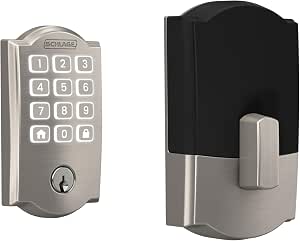 | Best for Large Households | Connectivity: Wi-Fi | Keypad: Backlit silicone push-button | Maximum access codes: 250 | VIEW ON AMAZON | See Our Full Breakdown |
| Philips Wi-Fi Smart Lock with Handle – Fingerprint, Keypad, App & Voice Control |  | Best for Fingerprint-First Entry | Model: DDL220X-1HW-H-NK | Connectivity: Wi-Fi | Fingerprint capacity: Up to 50 | VIEW ON AMAZON | See Our Full Breakdown |
| Schlage Encode Smart WiFi Deadbolt Lock with Century Trim, Satin Nickel |  | Best for High-Capacity Access Sharing | Connectivity: Wi-Fi | Access code capacity: Up to 100 codes | Voice control: Amazon Alexa and Google Assistant | VIEW ON AMAZON | See Our Full Breakdown |
| eufy Security FamiLock S3 Max Video Smart Lock with Palm Vein Recognition |  | Best Premium Video Lock | Unlock method: Palm vein recognition | Recognition speed: 0.6 seconds | Camera resolution: 2K HD | VIEW ON AMAZON | See Our Full Breakdown |
| Philips Wi-Fi Smart Keypad Deadbolt Lock Set with Handles |  | Best for Complete Door Hardware | Model: DDL240X-1HW-H2 | Unlocking methods: App, fingerprint, PIN code, key, Alexa, or Google Assistant | User codes: Up to 100 | VIEW ON AMAZON | See Our Full Breakdown |
| Philips Wi-Fi Smart Deadbolt Lock – Keyless Entry for Front Door |  | Best for Flexible Fingerprint Entry | Connectivity: Built-in 2.4 GHz Wi-Fi | Power source: AA alkaline batteries, not included | Fingerprint capacity: Multiple prints for family members | VIEW ON AMAZON | See Our Full Breakdown |
| Wyze Palm Lock Smart Door Lock with Palm Vein Recognition |  | Best for Contactless Entry | Unlock methods: Palm vein recognition, keypad, mechanical key, voice control | Guest access codes: Up to 50 unique or one-time codes | Main battery life: Up to 6 months | VIEW ON AMAZON | See Our Full Breakdown |
| highend smart door lock | Connectivity |
|---|---|
| Philips WiFi Keypad Door Lock | 2.4 GHz Wi-Fi; no hub required |
| Schlage Encode Smart WiFi Dead | Built-in Wi-Fi |
| Lockly Visage Zeno Series Smar | Built-in Wi-Fi |
| eufy Security Smart Lock C33 w | Built-in Wi-Fi |
| eufy Security Smart Lock C220 | Built-in Wi-Fi; no bridge required |
| WiFi Video Smart Lock with Han | 2.4GHz Wi-Fi |
| Philips Wi-Fi Smart Deadbolt L | 2.4GHz Wi-Fi |
| Schlage Encode Smart WiFi Leve | Built-in Wi-Fi |
| Schlage Arrive Smart WiFi Dead | Wi-Fi |
| Philips Wi-Fi Smart Lock with | Wi-Fi |
| Schlage Encode Smart WiFi Dead | Wi-Fi |
| eufy Security FamiLock S3 Max | — |
| Philips Wi-Fi Smart Keypad Dea | — |
| Philips Wi-Fi Smart Deadbolt L | Built-in 2.4 GHz Wi-Fi |
| Wyze Palm Lock Smart Door Lock | Wi-Fi |
More Details on Our Top Picks
Philips WiFi Keypad Door Lock with Handle – Built‑in WiFi, App Remote Control, Voice & Fingerprint Unlock, Auto‑Lock, Satin Nickel
The Philips 4200 Series makes the most sense for someone replacing a whole entry set: it pairs a keypad deadbolt with a matching handle, while the Schlage Encode is a deadbolt-only option. Built-in 2.4 GHz Wi-Fi supports remote access without a hub, and the 0.3-second fingerprint reader gives household members a quick way in without remembering a code. Multiple PIN options and an adjustable auto-lock timer add flexibility for shared doors. The tradeoff is a substantial eight-AA battery requirement; the Schlage Encode uses four included cells, so it asks less of the battery drawer. Choose Philips when the coordinated handle and varied entry methods matter more than minimizing battery count.
Pros:- Includes a matching handle set for a coordinated entry upgrade
- Built-in 2.4 GHz Wi-Fi enables remote app access without a hub
- Fingerprint unlocking, PIN codes, and voice control offer several ways to enter
- Auto-lock timer can be set from 0 to 180 seconds
Cons:- Requires eight AA batteries, which are not included
- The supplied description does not specify a physical backup key
Best for: Homeowners replacing both the deadbolt and handle who want fingerprint entry and direct Wi-Fi access
Not ideal for: Buyers who want a deadbolt-only replacement or prefer a lock that arrives with its batteries included
- Connectivity:2.4 GHz Wi-Fi; no hub required
- Unlock methods:Fingerprint, PIN, app, Alexa, and Google Assistant
- Fingerprint speed:0.3 seconds
- Auto-lock timer:0–180 seconds
- Power:8 AA alkaline batteries, not included
- Door thickness:1-3/8 to 1-3/4 inches
- Finish:Satin Nickel
- App:Philips Home Access for iOS and Android
Our verdict“Pick the Philips 4200 Series if you want a complete handle-and-lock upgrade with fingerprint access and direct Wi-Fi control.”
Schlage Encode Smart WiFi Deadbolt with Camelot Trim, Satin Nickel
The Schlage Encode is the lineup’s practical choice for homes that manage many temporary or recurring users. Its capacity for up to 100 access codes and lock history give an owner more room to track access than the Philips 4200 Series’ description specifies. Built-in Wi-Fi allows remote management through the Schlage Home app, while a customizable alarm and physical backup key add useful fallback options. Compared with the fingerprint-focused Lockly Visage Zeno, this Schlage relies on codes and a touchscreen rather than face or fingerprint recognition. That simpler access model may suit rentals or busy households, but it means users must remember a code. Four included AA batteries ease setup, though typical battery life is listed at up to six months.
Pros:- Stores up to 100 access codes and provides lock history
- Built-in Wi-Fi supports remote control through the Schlage Home app
- Includes a physical backup key and four AA batteries
- Customizable alarm adds an alert option beyond access codes
Cons:- Typical battery life is listed at up to six months
- Connected features depend on a secure Wi-Fi network and the Schlage Home app
- Entry uses a touchscreen and key rather than fingerprint or facial recognition
Best for: Owners of rentals or busy households who need to issue and manage many individual entry codes
Not ideal for: Buyers who want biometric entry or longer listed battery life between replacements
- Connectivity:Built-in Wi-Fi
- App:Schlage Home
- Access code capacity:Up to 100 codes
- Voice assistants:Amazon Alexa and Google Home
- Power:Four included AA batteries
- Battery life:Up to six months with typical use
- Door thickness:1-3/8 to 1-3/4 inches
- Backset:2-3/8 or 2-3/4 inches
- Backup key and trim:One physical key; Camelot trim; Satin Nickel finish
Our verdict“Choose the Schlage Encode if managing a large set of access codes matters more than biometric unlocking.”
Lockly Visage Zeno Series Smart Lock with Facial Recognition and Fingerprint Access
Lockly’s Visage Zeno is the most feature-rich access system in this group: it combines facial recognition, fingerprint, keypad, app, and physical-key entry, with Apple Home Key and voice-assistant support. Its 0.2-second fingerprint recognition is slightly faster on paper than the Philips 4200 Series’ 0.3 seconds, while Apple Home integration gives it a different smart-home path from the Schlage Encode. Two rechargeable 10,000 mAh batteries are included, avoiding the recurring AA purchases required by Philips and eufy’s C220. That breadth brings more electronic features to depend on, and listed battery life is up to six months with normal use. Choose it for flexible, hands-free entry; skip it if a straightforward keypad deadbolt is all you need.
Pros:- Combines facial recognition, fingerprint, keypad, app, and physical-key access
- Supports Apple Home Key, Alexa, and Google Voice Assistant
- Includes two rechargeable 10,000 mAh batteries
- Fits doors from 1-3/8 to 2 inches thick
Cons:- Battery life is listed at up to six months and varies with use
- Facial recognition and other smart entry methods depend on powered electronics
- The larger set of access features may be unnecessary for buyers who only need keypad entry
Best for: Apple Home households and tech-forward owners who want several biometric and keyless entry choices
Not ideal for: Buyers who prefer a simple keypad deadbolt or want to avoid relying on powered electronic entry features
- Unlock methods:Facial recognition, fingerprint, app, keypad, physical key, Apple Watch, Alexa, and Google Voice Assistant
- Fingerprint capacity:Up to 99 fingerprints
- Fingerprint recognition:0.2 seconds
- Connectivity:Built-in Wi-Fi
- Smart home integration:Apple Home Key, Alexa, and Google Voice Assistant
- Battery:Two rechargeable 10,000 mAh lithium batteries
- Battery life:Up to six months with normal use
- Door thickness:1-3/8 to 2 inches
- Installation time:Approximately 15 minutes
Our verdict“Choose the Lockly Visage Zeno if you want premium biometric variety and Apple Home Key support in one lock.”
eufy Security Smart Lock C33 with Keypad and Handle
The eufy C33 is aimed at buyers who want a fingerprint lock and matching handle with a short installation process. Built-in Wi-Fi enables app-based remote access, notifications, and event history, while compatibility with left- and right-hand doors broadens where the set can fit. The Lockly Visage Zeno offers more ways to enter, including facial recognition and Apple Home Key; the C33 keeps the access list to fingerprint, keypad, and app, which is easier to parse if those cover the household’s needs. Its stated installation time is about 15 minutes without drilling, but the product data does not list a physical key or voice-assistant support. Eight AA batteries also mean regular battery planning.
Pros:- Combines fingerprint, keypad, and app access
- Built-in Wi-Fi supports remote access, notifications, and event history
- Designed for installation in about 15 minutes without drilling
- Works with left- and right-hand doors
Cons:- Requires eight AA batteries
- Product information does not specify a physical backup key or voice-assistant support
- Offers fewer listed entry methods than the Lockly Visage Zeno
Best for: Homeowners seeking a quick-install handle set with fingerprint, keypad, and remote app access
Not ideal for: Buyers who need documented physical-key backup, voice control, or a rechargeable battery system
- Access methods:Fingerprint, keypad, and app
- Connectivity:Built-in Wi-Fi
- Power:8 AA batteries
- Installation time:About 15 minutes
- Door handing:Compatible with left- and right-hand doors
- Installation:Designed for installation without drilling
- Coverage:18 months
Our verdict“Pick the eufy C33 if a quick-install handle set with fingerprint and app access fits your entry needs.”
eufy Security Smart Lock C220 Fingerprint Keyless Entry Door Lock
The eufy C220 packs a broad set of access features into a deadbolt-only format: fingerprint, keypad, app, voice control, and two physical keys. Built-in Wi-Fi avoids a separate bridge, and its listed battery life of up to eight months exceeds the six-month figures given for the Schlage Encode and Lockly Visage Zeno. It also carries BHMA Grade 3 certification and an IP53 rating, useful markers for buyers weighing basic durability and weather resistance. Compared with eufy’s C33, the C220 includes physical keys and stated Alexa and Google Assistant support, but it does not include a handle set. Its AA power and potentially complex initial setup make it a less appealing fit for buyers seeking a ready-to-pair, low-maintenance installation.
Pros:- Offers fingerprint, keypad, app, voice, and physical-key entry
- Built-in Wi-Fi provides remote access without a bridge
- Battery life is listed at up to eight months with standard AA cells
- BHMA Grade 3 certification and IP53 water resistance
Cons:- Uses eight AA batteries that need periodic replacement
- Initial setup may be complex for non-technical users
- Deadbolt-only design does not provide the matching handle included with the Philips 4200 Series
Best for: Buyers who want fingerprint, keypad, voice, and physical-key access in a Wi-Fi deadbolt
Not ideal for: Homeowners replacing both lock and handle together or those who want rechargeable batteries and simpler setup
- Unlock methods:Fingerprint, keypad, app, voice, and physical key
- Connectivity:Built-in Wi-Fi; no bridge required
- Battery type:8 AA batteries
- Battery life:Up to eight months; varies with use
- Certification:BHMA Grade 3
- Water resistance:IP53
- Operating temperature:-22°F to 158°F (-30°C to 70°C)
- Installation fit:Fits deadbolts under 54 mm bore
- Included components:2 keys, 8 AA batteries, exterior and interior assembly kits
Our verdict“Choose the eufy C220 if you want a versatile Wi-Fi deadbolt with physical keys and several keyless entry options.”
WiFi Video Smart Lock with Handle, 5-in-1 Keyless Deadbolt
This lock combines entry control and front-door monitoring in one package: a 150° camera, doorbell, two-way audio, fingerprint reader, and keypad work together, so it suits buyers who want fewer separate devices by the door. Its 7,800mAh rechargeable battery also avoids the frequent AA changes of options such as the Philips Wi-Fi Smart Deadbolt Lock Set. The tradeoff is that the extra camera and video features make it a more involved choice than the simpler Schlage Encode Smart WiFi Lever Lock, which focuses on access codes and remote control. This model needs a 2.4GHz Wi-Fi network, and the product data cautions that installation may depend on door standards. I’d choose it for video and multiple entry methods in one unit, not for a straightforward keypad upgrade.
Pros:- Combines a camera, doorbell, two-way audio, and lock in one unit
- Rechargeable 7,800mAh battery
- Fingerprint, app, keypad, and mechanical key entry
- Basic app functions have no monthly fee
Cons:- Wi-Fi connectivity is limited to 2.4GHz
- Installation may not suit every door
- More features to set up than a lock focused on keypad access
Best for: Homeowners who want a camera, doorbell, and several keyless entry methods integrated at the front door
Not ideal for: Buyers with only 5GHz Wi-Fi or doors that do not meet the lock’s installation requirements
- Connectivity:2.4GHz Wi-Fi
- Camera angle:150° wide-angle
- Battery:7,800mAh rechargeable lithium
- Unlock methods:Fingerprint, app, keypad, mechanical key
- Smart home compatibility:Alexa, Google Assistant, Tuya App
- Weather resistance:IP54
- Operating temperature:-31°F to 158°F
- Warranty:18 months
Our verdict“Choose this if you want video monitoring and multiple entry options built into one front-door device and your Wi-Fi and door fit its requirements.”
Philips Wi-Fi Smart Deadbolt Lock Set with Fingerprint Keypad and Handle
The 100-passcode capacity and time-sensitive guest codes make this Philips a practical fit for households with recurring visitors, cleaners, or short-term guests. It also pairs fingerprint access with a handle set, while remote status checks and alerts let an owner manage entry away from home. Compared with the video-focused WiFi Video Smart Lock with Handle, this model keeps the job centered on access control rather than adding a camera and doorbell. Its 0.3-second fingerprint unlock and five entry methods offer flexibility, but the lock runs on four AA batteries that are not included, unlike the video model’s rechargeable pack. The 2.4GHz-only Wi-Fi also narrows network compatibility. I’d place it ahead of simpler keypad locks for managed guest entry, while buyers wanting video should look elsewhere.
Pros:- Stores up to 100 passcodes
- Supports time-sensitive guest passcodes and remote access management
- Fingerprint, app, passcode, backup key, and voice-control entry
- Includes a matching handle and is designed for DIY installation
Cons:- Four AA batteries are required and not included
- Wi-Fi is limited to 2.4GHz
- IP53 water resistance offers less protection than the IP54 rating listed for the WiFi Video Smart Lock
Best for: Households that regularly grant temporary or individual access to guests, service providers, or renters
Not ideal for: Buyers who need a camera at the door, use only 5GHz Wi-Fi, or want a rechargeable battery included
- Model:DDL242X-1HW-H-NEW
- Connectivity:2.4GHz Wi-Fi
- Unlock methods:Fingerprint, app, passcode, backup key, Alexa or Google Assistant
- Fingerprint unlock time:0.3 seconds
- Auto-lock timer:10–180 seconds
- Passcode capacity:Up to 100
- Water resistance:IP53
- Door thickness:1-3/8 to 2 inches
- Power:4 AA batteries (not included)
Our verdict“Pick this Philips for flexible guest codes and fingerprint entry on a standard US door, provided 2.4GHz Wi-Fi and AA batteries suit your setup.”
Schlage Encode Smart WiFi Lever Lock – Century Trim, Matte Black
The BHMA security, durability, and finish certification gives this Schlage a distinct place in a high-end roundup: it emphasizes a certified hardware standard alongside app-managed access. Built-in Wi-Fi means remote control needs no separate hub, and 100 access codes can accommodate a busy household or regular visitors. Compared with the Schlage Arrive Smart WiFi Deadbolt, which supports up to 250 codes, the Encode lever offers less code capacity but a lever format that may suit doors where a lever lock is preferred. That format and door compatibility deserve attention before buying; installation may require professional help for some doors. It also relies on Wi-Fi, with no Bluetooth or Zigbee fallback listed. I’d favor it when certified durability and a lever design matter more than maximum code capacity or alternative wireless connections.
Pros:- BHMA certification for security, durability, and finish
- Built-in Wi-Fi avoids a separate hub
- Supports up to 100 access codes
- Works with the Schlage Home app, Alexa, and Google Assistant
Cons:- No Bluetooth or Zigbee fallback is listed
- Some door types may require professional installation
- Supports fewer codes than the Schlage Arrive Smart WiFi Deadbolt
Best for: Buyers seeking a Wi-Fi lever lock with stated BHMA certification and app-managed access codes
Not ideal for: Households that need more than 100 codes, wireless fallback options, or a lock guaranteed to fit without installation help
- Model:Encode Smart WiFi Lever
- Finish:Matte Black
- Trim style:Century
- Connectivity:Built-in Wi-Fi
- Control:Schlage Home app, Alexa, Google Assistant
- Access code capacity:100 codes
- Auto-lock:Adjustable delay via app
- Certification:BHMA highest security, durability, and finish standards
Our verdict“Choose the Encode lever when certified hardware standards and built-in Wi-Fi matter more than a large code roster or wireless fallback.”
Schlage Arrive Smart WiFi Deadbolt Lock with Camelot Trim, Satin Nickel
With space for up to 250 access codes, the Arrive suits a home where many people need individual entry credentials. The backlit silicone keypad helps with nighttime access, while app controls add remote locking, code management, and lock history. Compared with the Schlage Encode Smart WiFi Lever Lock, it doubles the listed code capacity and uses a deadbolt format, but it does not offer that model’s stated BHMA certification. Its battery-powered operation keeps the lock usable during power outages; remote functions still depend on Wi-Fi, so offline operation does not mean remote access during a network failure. Door fit is also specific: it supports 1-3/8 to 1-3/4-inch doors and two backset sizes. I’d favor this for many users and codes, provided the door dimensions match.
Pros:- Stores up to 250 access codes
- Backlit silicone keypad supports entry in low light
- App provides remote control, code management, and lock history
- Battery-powered lock continues operating during power outages
Cons:- Remote features require a stable Wi-Fi connection
- Battery replacement is needed periodically
- Door compatibility is limited to the listed thickness and backset measurements
Best for: Large households, shared homes, or property managers who need many individually managed access codes
Not ideal for: Buyers whose doors fall outside the listed thickness and backset dimensions or who need remote control through an internet outage
- Connectivity:Wi-Fi
- Keypad:Backlit silicone push-button
- Maximum access codes:250
- Door thickness:1-3/8 to 1-3/4 inches
- Backset compatibility:2-3/8 or 2-3/4 inches
- Finish:Satin Nickel
- Power:Battery
- Voice control:Alexa and Google Home
Our verdict“Choose the Arrive if you need a high-capacity code-managed deadbolt and your door matches its specified dimensions.”
Philips Wi-Fi Smart Lock with Handle – Fingerprint, Keypad, App & Voice Control
The fingerprint reader built into the handle makes this Philips a strong match for buyers who want quick biometric entry to be the everyday default. It stores up to 50 fingerprints and 100 PIN codes, while app access, voice control, a physical key, and activity logs provide alternate ways to manage the door. Compared with the Philips Wi-Fi Smart Deadbolt Lock Set with Fingerprint Keypad and Handle, it shares the quick 0.3-second fingerprint claim but lists a broader 5–180-second auto-lock range and a two-year warranty. It is less suited to buyers seeking a camera: the WiFi Video Smart Lock adds video monitoring and a doorbell. This Philips also calls for stable Wi-Fi for remote features, and installation may be more complex than a standard deadbolt. I’d pick it when fingerprint access is the priority.
Pros:- Fingerprint reader is built into the handle and lists 0.3-second unlocking
- Stores up to 50 fingerprints and 100 PIN codes
- Includes app, voice, PIN, fingerprint, and physical-key access
- Offers activity logs, real-time alerts, and adjustable auto-lock
Cons:- Remote features depend on stable Wi-Fi
- Installation may be more complex than a standard deadbolt
- Does not include the camera and doorbell functions of the WiFi Video Smart Lock
Best for: Families or shared households who want several fingerprint users and PIN codes on a handle-style lock
Not ideal for: Buyers who want video monitoring, simpler deadbolt installation, or remote controls that do not rely on stable Wi-Fi
- Model:DDL220X-1HW-H-NK
- Connectivity:Wi-Fi
- Fingerprint capacity:Up to 50
- PIN code capacity:Up to 100
- Unlock methods:Fingerprint, mobile app, PIN code, voice control, physical key
- Auto-lock timer:5–180 seconds
- Warranty:2 years
- Included components:Mechanical keys, screws, smart door lock, user manual
Our verdict“Choose this Philips when fast fingerprint access for multiple people matters more than video features or a simpler deadbolt installation.”
Schlage Encode Smart WiFi Deadbolt Lock with Century Trim, Satin Nickel
The Schlage Encode makes the most sense for households that need dependable remote access and room for a long list of users. Its 100 access codes outpace the Wyze Palm Lock’s 50 guest codes, which gives a family more flexibility for recurring visitors or service providers. Built-in Wi-Fi also lets you manage the lock through the Schlage Home app without relying on a separate hub, while the built-in alarm adds a layer of awareness at the door. Its clean deadbolt setup is simpler than the eufy FamiLock S3 Max, which adds a camera, doorbell, and rear screen. The tradeoff is fewer entry methods: there’s no fingerprint or palm recognition. It also runs on AA batteries, and app setup may take patience for people new to smart-home systems.
Pros:- Stores up to 100 access codes for a large household or frequent visitors.
- Built-in Wi-Fi supports remote locking and monitoring through the app.
- Adjustable auto-lock and a built-in alarm add useful door security features.
- Snap ‘n Stay design supports DIY installation without hardwiring.
Cons:- Entry is centered on app and codes rather than fingerprint or palm recognition.
- AA batteries need periodic replacement, with listed life of up to six months.
- Initial app setup may be challenging for smart-home newcomers.
Best for: Households that share access with many relatives, visitors, and service providers and want remote control without a hub.
Not ideal for: Buyers who want biometric entry or a built-in camera and visitor screen.
- Connectivity:Wi-Fi
- Access code capacity:Up to 100 codes
- Voice control:Amazon Alexa and Google Assistant
- Battery type:4 AA batteries, included
- Battery life:Up to 6 months
- Door thickness fit:1-3/8 in to 1-3/4 in
- Backset fit:2-3/8 in or 2-3/4 in
- Finish and trim:Satin Nickel, Century Trim
Our verdict“Choose the Schlage Encode if a large, remotely managed access-code list matters more than biometric entry or video features.”
eufy Security FamiLock S3 Max Video Smart Lock with Palm Vein Recognition
The FamiLock S3 Max is the most feature-rich choice here for buyers who want the door lock and visitor check-in to work as one system. Palm vein recognition provides quick, contactless entry, while its 2K camera, doorbell, and rear screen let someone inside check a visitor without opening a phone app. That combination goes well beyond the Schlage Encode’s access-code and alarm focus, but it also makes the FamiLock a more involved purchase and installation. Matter support connects it with Apple Home, Google Home, Alexa, and SmartThings, though camera streams do not run through Matter. Its rechargeable battery is rated for up to four months, with AAA batteries as emergency power. Buyers already using HomeBase 2 should skip it: this lock works with HomeBase 3, not the older hub.
Pros:- Combines palm vein entry, a 2K camera, video doorbell, and rear status screen.
- Palm recognition is specified to unlock in 0.6 seconds, with data stored locally.
- Matter support covers Apple Home, Google Home, Alexa, and SmartThings.
- Emergency AAA batteries provide essential functionality if the rechargeable battery runs low.
Cons:- Camera streams are not supported through Matter.
- Incompatible with HomeBase 2, requiring HomeBase 3 for that ecosystem.
- Rechargeable battery life is listed as up to four months.
Best for: Smart-home households seeking contactless entry and an integrated camera, doorbell, and indoor visitor screen.
Not ideal for: HomeBase 2 owners or buyers who want camera feeds available through Matter integrations.
- Unlock method:Palm vein recognition
- Recognition speed:0.6 seconds
- Camera resolution:2K HD
- Doorbell viewing angle:150°
- Rechargeable battery life:Up to 4 months
- Emergency power:4 AAA batteries; up to 1 month of essential functionality
- Smart-home compatibility:Matter, Apple Home, Google Home, Alexa, SmartThings
- HomeBase compatibility:HomeBase 3; not compatible with HomeBase 2
Our verdict“Pick the FamiLock S3 Max if an integrated visitor camera and contactless palm entry justify a more involved smart-lock setup.”
Philips Wi-Fi Smart Keypad Deadbolt Lock Set with Handles
This Philips set suits a buyer replacing both the deadbolt and the handles, rather than adding a smart lock to existing hardware. It offers five entry routes—app, fingerprint, PIN, key, and voice assistant—plus remote status checks, notifications, and an adjustable auto-lock timer. That makes it more versatile at the door than the Schlage Encode, which relies on codes and app access. The set also accepts up to 100 user codes and unlimited one-time PINs, a useful distinction for short-term access. Its fit is narrower than the Philips Wi-Fi Smart Deadbolt’s: the set is listed for doors 35–50 mm thick, so measuring first matters. Voice access depends on Alexa or Google Assistant, and buyers who only need a deadbolt may not want the included handles.
Pros:- Combines deadbolt and handle set for a coordinated hardware replacement.
- Supports app, fingerprint, PIN, physical key, and voice assistant unlocking.
- Allows up to 100 user codes and unlimited one-time PINs.
- Adjustable auto-lock timer runs from 30 to 180 seconds.
Cons:- Door thickness and hardware fit should be checked before purchase.
- Voice control requires Amazon Alexa or Google Assistant.
- Less suitable for buyers who only need to replace a deadbolt.
Best for: Homeowners replacing a deadbolt and matching handles who want fingerprint entry plus flexible temporary codes.
Not ideal for: Buyers keeping their current handles or whose door thickness falls outside the 35–50 mm fit range.
- Model:DDL240X-1HW-H2
- Unlocking methods:App, fingerprint, PIN code, key, Alexa, or Google Assistant
- User codes:Up to 100
- One-time PIN codes:Unlimited
- Auto-lock timer:30–180 seconds
- Compatible door thickness:35–50 mm
- Included components:Door lock, handle set, 4 batteries
- Recommended use:Home
Our verdict“Choose this Philips set when you are replacing the handles too and want fingerprint entry with broad code options.”
Philips Wi-Fi Smart Deadbolt Lock – Keyless Entry for Front Door
This Philips deadbolt is a practical fit for households that want biometric entry and remote control without adding a handle set or separate hub. Its built-in 2.4 GHz Wi-Fi supports app access and real-time alerts, while fingerprint, passcode, physical key, and voice options give residents alternatives when one method is inconvenient. Compared with the Schlage Encode, it adds fingerprint unlocking; compared with the Philips keypad deadbolt-and-handle set, it keeps the job focused on the deadbolt. The tradeoff is network and power flexibility: it supports only 2.4 GHz Wi-Fi and uses AA alkaline batteries, with no rechargeable option listed. The stated remote range is up to 65 feet from the router, so placement and signal strength may shape how useful remote access feels.
Pros:- Fingerprint, passcode, key, app, and voice options suit different household routines.
- Built-in Wi-Fi enables remote locking without a hub.
- Stores up to 100 custom passcodes and multiple family fingerprints.
- Real-time alerts and access history help track door activity.
Cons:- Works on 2.4 GHz Wi-Fi only.
- Requires AA alkaline batteries, which are not included.
- Remote range is specified as up to 65 feet from the router.
Best for: Households wanting fingerprint access and remote deadbolt control while retaining their existing handles.
Not ideal for: Homes that rely on 5 GHz-only networks or buyers who prefer rechargeable lock batteries.
- Connectivity:Built-in 2.4 GHz Wi-Fi
- Power source:AA alkaline batteries, not included
- Fingerprint capacity:Multiple prints for family members
- Passcode capacity:Up to 100 custom codes
- Auto-lock timer:10–180 seconds
- Door thickness compatibility:1-3/8 in to 2 in (38–50 mm)
- Voice assistant support:Alexa and Google Assistant
- Remote range:Up to 65 ft from router
Our verdict“Choose this Philips model for fingerprint convenience and hub-free remote access if your network supports 2.4 GHz Wi-Fi.”
Wyze Palm Lock Smart Door Lock with Palm Vein Recognition
The Wyze Palm Lock brings contactless palm vein entry to a simpler setup than the camera-equipped eufy FamiLock S3 Max. It adds an illuminated keypad, mechanical keys, Alexa and Google Assistant control, and USB-C emergency charging, so a household has several ways to get in if the palm reader or main battery is unavailable. Remote control, guest codes, and automatic locking cover the core connected-lock needs, while tamper and ajar alarms add alerts focused on the door itself. Its limit is capacity: it supports up to 50 guest codes, compared with the Schlage Encode’s 100 access codes. Battery life is also split between a main pack rated for up to six months and a backup rated for only two weeks. Remote features depend on Wi-Fi and the Wyze app.
Pros:- Palm vein recognition provides touch-free unlocking.
- Keypad, mechanical keys, and USB-C emergency charging provide backup access options.
- Supports remote control, automatic locking, and up to 50 guest codes.
- Tamper and door-ajar alarms alert users to specific door events.
Cons:- Guest-code capacity is lower than the Schlage Encode’s 100 codes.
- Backup battery life is listed as up to two weeks.
- Remote controls and notifications depend on Wi-Fi and the Wyze app.
Best for: Households that want touch-free palm entry with keypad and physical-key backups, plus basic remote access.
Not ideal for: Homes needing more than 50 guest codes or a built-in camera and visitor-screen system.
- Unlock methods:Palm vein recognition, keypad, mechanical key, voice control
- Guest access codes:Up to 50 unique or one-time codes
- Main battery life:Up to 6 months
- Secondary battery life:Up to 2 weeks
- Emergency charging:USB-C
- Connectivity:Wi-Fi
- Smart-home compatibility:Alexa and Google Assistant
- Weather resistance and certification:IP53; BHMA Grade 3
- Alarms:Tamper and door-ajar alerts
Our verdict“Pick the Wyze Palm Lock if contactless entry and several fallback methods matter more than a camera or a large access-code roster.”

How We Picked
I ranked these 15 locks by how well their feature set serves a clear buyer need in a high-end home setup. My main criteria were access options, connectivity, lock format, expected day-to-day usability, and the practical complexity that comes with video or biometric features. I gave weight to products with a clear role and a useful balance of capabilities, rather than treating a longer feature list as an automatic advantage.
The ranking also reflects fit: a deadbolt, a lever, and a handle set solve different door needs, and a fingerprint reader is not a substitute for checking compatibility or installation requirements. Schlage’s Encode models lead for their direct Wi-Fi approach and conventional form factors; Lockly and eufy’s premium models stand out for advanced recognition; and the Philips and eufy alternatives cover varied combinations of access methods. Where product names and listed features do not establish details such as smart-home compatibility, backup access, or video storage, I treat those as points buyers should verify before choosing.
Factors to Consider When Choosing Highend Smart Door Locks
Choosing a connected lock starts with the door and household routine, then moves to smart features. I would check the physical fit and access plan before deciding whether biometrics, video, or remote control add enough value to justify their extra setup and upkeep.
Match the Lock Format to the Door
Start by identifying whether the door needs a deadbolt, a lever lock, or a handle set. These are not interchangeable choices: a lever may suit an entry door configured for one, while a deadbolt replaces a different part of the hardware. Measure the existing cutouts and check door thickness, handing, and the lock’s installation requirements before ordering. A feature-rich lock can still be the wrong purchase if it does not fit the door or leaves you needing additional hardware. For replacements, compare the included exterior and interior pieces with what is already installed. When the door has an unusual setup, resolve fit questions before weighing app features.
Pick Access Methods for the People Who Use the Door
Keypads work well for households that share temporary or recurring access, while fingerprint readers can speed up entry for people who use the lock regularly. Facial and palm vein recognition may reduce the need to touch a keypad, but every user still needs a reliable fallback if recognition fails or their hands are occupied. Think through guests, children, cleaners, and anyone who may struggle with a particular method. More access methods can offer flexibility, but they also mean more settings and credentials to manage. Choose around the least convenient regular user, not only the person configuring the lock. Keep a backup entry plan that does not depend on the same sensor or connection as the primary method.
Check Connectivity and Smart Home Fit
Built-in Wi-Fi can make remote access more direct, but it does not guarantee compatibility with every smart home platform or voice assistant. Before buying, verify the exact model’s supported ecosystems, app requirements, and any hub or account requirements. Consider where your router reaches: a lock at a distant entry may have a weaker connection than other devices in the home. If you mainly want local keyless entry, remote features may add little to your routine. If you need to check or control the lock away from home, confirm which actions work remotely and what happens during an internet outage. Avoid assuming that two locks from the same brand share the same integrations.
Decide Whether Video Earns a Place on the Door
Video locks combine entry control with a way to see activity at the entrance, which can reduce the need for separate devices. That combination also puts more functions into one piece of exterior hardware, so check the camera’s field of view, notification options, storage terms, and power needs for the exact model. Consider whether your doorway has enough light and a clear view of visitors. A camera aimed at a wall or shared walkway may deliver less useful information than a separate camera placed with care. Video can be a poor fit if you want a minimal exterior or do not want another stream of notifications. Decide first whether seeing visitors at the lock solves a real problem for your household.
Plan for Batteries, Outages, and Backup Entry
Connected locks depend on battery power, and some features may also depend on network access or cloud services. Check the manufacturer’s stated battery type, warning behavior, and emergency power or mechanical key provisions for the specific model. Do not assume a keypad, fingerprint reader, or video feature will remain available in the same way when power is low. Think about how often the door is used and whether someone can replace batteries promptly. A backup key or other independent entry method can prevent a dead battery from becoming a lockout. Keep that backup accessible without storing it in an obvious place near the door.
Pay for Features You Will Use
A premium lock is most useful when its extra capabilities solve a recurring need, such as granting codes to visitors or checking the door remotely. Biometrics and video may suit busy households, but they add setup choices and can create new maintenance or privacy questions. If your main goal is keyless entry, a simpler keypad or fingerprint model may be easier to live with than a camera-equipped unit. Compare the complete installation requirements and any ongoing service needs, not just the headline feature list. Also consider how many people need access and how often those permissions change. The right level of complexity is the one your household will maintain.
Frequently Asked Questions
Should I choose a deadbolt, a lever lock, or a handle set?
Choose based on the hardware your door is designed to accept and the parts you intend to replace. A deadbolt is a separate locking mechanism, while a lever lock or handle set combines the lock with door-opening hardware in a different format. Check measurements, door handing, and the product’s installation requirements before comparing smart features. If the existing door has both a knob and deadbolt, a single smart lever may not replace both functions. When the configuration is unclear, confirm the fit with the manufacturer or an installer before purchase.
Are facial or palm vein locks a better choice than fingerprint locks?
They can be more convenient for a household that prefers hands-free or touch-free entry, but convenience depends on reliable recognition for the people who use the door. Fingerprint access is a more familiar biometric method and appears in several formats across this roundup. Facial and palm vein models add specialized sensors, so check the supported users, setup process, and backup entry options. No biometric method should be the only way into the home. Choose the recognition type that suits your routine and retain a dependable alternative.
Is built-in Wi-Fi worth choosing over a lock with fewer connected features?
Built-in Wi-Fi is useful when you expect to manage access or check lock status while away from home. It may be unnecessary if you mainly want a keypad or fingerprint reader for local entry. Confirm the exact model’s remote functions, network requirements, and smart home support, since Wi-Fi alone does not promise every integration. Also consider the quality of the signal near the door and what functions remain available if the connection drops. A simpler lock can be the more practical choice when remote control is not part of your routine.
What should I verify before replacing my existing front door lock?
Check the lock type, cutout dimensions, door thickness, handing, and whether the product includes the exterior and interior hardware you need. A deadbolt replacement may not address a separate lever or handle, and a complete handle set may not match an existing door preparation. Review the installation instructions and any stated requirements for a door that does not latch smoothly. If you rent or live in a building with hardware rules, confirm what changes are allowed. These checks can prevent choosing a capable model that does not fit your entry.
Do I still need a backup key or entry method with a smart lock?
A backup is sensible because batteries, sensors, phones, and network connections can fail or become unavailable. Check whether the exact lock includes a physical keyway or another emergency entry method, and learn how its low-battery warnings work. Keep a backup option accessible to someone in the household without leaving it in an obvious spot. If the lock relies heavily on biometrics, test the alternate method during setup rather than waiting for a problem. A connected lock should make entry easier while leaving a clear way in when its main feature is unavailable.
Conclusion
For most buyers seeking a polished smart deadbolt with direct connectivity, I recommend the Schlage Encode Smart WiFi Deadbolt as the best overall fit. My best value pick is the eufy C220 for households that want fingerprint access in a deadbolt, while the Lockly Visage Zeno and eufy FamiLock S3 Max are the premium choices for facial recognition or palm vein recognition with video. Beginners should start with a straightforward keypad or fingerprint model whose hardware matches the existing door, such as a suitable Schlage Encode or Philips option. For a door that calls for a lever, the Schlage Encode Lever has a clearer role than adapting a deadbolt pick. Choose the lock format first, then select the access features your household will actually use.